Difference between revisions of "K-9 Mail"
Jump to navigation
Jump to search
(→Incoming server settings) |
(→Incoming server settings) |
||
| Line 12: | Line 12: | ||
=Incoming server settings= | =Incoming server settings= | ||
| − | <gallery widths=" | + | <gallery widths="600x"> |
k92.png|For '''What kind of account is this?''' tap '''IMAP'''. | k92.png|For '''What kind of account is this?''' tap '''IMAP'''. | ||
k93.png|Enter the following settings:<br />IMAP server: '''imap.imaginet.co.za'''<br />Security: '''SSL/TLS'''<br />IMAP Port: '''993''' | k93.png|Enter the following settings:<br />IMAP server: '''imap.imaginet.co.za'''<br />Security: '''SSL/TLS'''<br />IMAP Port: '''993''' | ||
Revision as of 16:00, 31 March 2023
K-9 Mail is an open source, lightweight mail client for Android, with GPG support.
Add an account

Incoming server settings
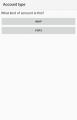
For What kind of account is this? tap IMAP.
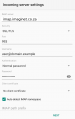
Enter the following settings:
IMAP server: imap.imaginet.co.za
Security: SSL/TLS
IMAP Port: 993


Tap NEXT.
