Setting up your site doesn't have to be difficult or take a long time. It can take just a few minutes to set up and publish a basic site, and the SiteCreator makes it easy to update, edit, and grow your site at your convenience. Remember, having a website, 'any website', is better than no website. Your site does not have to be perfect, and you don't have to finish it today.
Selecting a template
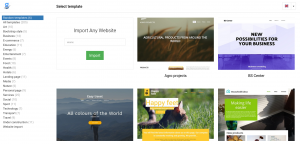
Template selection screen
When you first log in to your new SiteCreator system, you'll be presented with a template selection screen. Which template you should choose depends on:
- Your business or projects 'branding, style, and "vibe"'.
- Whether you have 'text content ("copy"), information, images, video, or other media ("assets")' to include now, or if you'd like to do that later. You don't need any assets to get started! A simple landing page with a contact form is more than enough to establish your online presence.
- 'The purpose of your website'. It could be
 * an `Under Constrcution` site, letting visitors know that more content is coming soon
 * a simple site with just your business contact information, links to your social media, a map to your premises, etc.
 * a portfolio of your work
 * a shop with a catalog of your products and services
 * a personal site with information about the things you love
 * an informational site about a project, event, or product you're working on
 * an automatic import of another site you own
Available templates
Setting up basic site info

