Difference between revisions of "Creating a new email address"
Jump to navigation
Jump to search
(Created page with "Log into http://my.imaginet.co.za/ and click on '''Email''' in the menu on the left (Fig. 1). frame|left|Fig. 1 <br /> You will be presented with a list...") |
|||
| Line 6: | Line 6: | ||
Enter the username - the part of the address before the @. <br /> | Enter the username - the part of the address before the @. <br /> | ||
Click '''Accept'''. <br /> | Click '''Accept'''. <br /> | ||
| + | You will need to enter your chosen password twice. Ensure that it's the same both times. <br /> | ||
| + | Click '''Add'''. | ||
[[file:Newaddress.JPG]] <br /> | [[file:Newaddress.JPG]] <br /> | ||
Revision as of 19:01, 13 November 2012
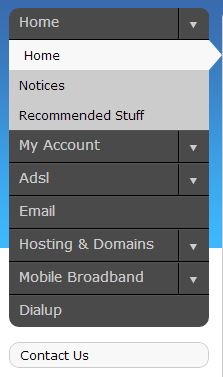
Log into http://my.imaginet.co.za/ and click on Email in the menu on the left (Fig. 1).

Fig. 1
You will be presented with a list of domains.
Click the Add button at the top right.
Select the domain @ which you would like to create a new email address.
Enter the username - the part of the address before the @.
Click Accept.
You will need to enter your chosen password twice. Ensure that it's the same both times.
Click Add.

