Difference between revisions of "Setting up an Auto-Reply"
Jump to navigation
Jump to search
(Created page with "Log into http://my.imaginet.co.za/ and click on '''Email''' in the menu on the left (Fig. 1). frame|left|Fig. 1 <br /> You will be presented with a list...") |
|||
| Line 1: | Line 1: | ||
Log into http://my.imaginet.co.za/ and click on '''Email''' in the menu on the left (Fig. 1). [[file:Mydotmenu.JPG|frame|left|Fig. 1]] | Log into http://my.imaginet.co.za/ and click on '''Email''' in the menu on the left (Fig. 1). [[file:Mydotmenu.JPG|frame|left|Fig. 1]] | ||
<br /> | <br /> | ||
| − | You will be presented with a list of domains. <br /> | + | * You will be presented with a list of domains. <br /> |
| − | Locate your email address by scrolling to the correct domain and clicking '''View'''. <br /> | + | * Locate your email address by scrolling to the correct domain and clicking '''View'''. <br /> |
| − | Scroll to the address you wish to modify, and click '''Edit'''. <br /> | + | * Scroll to the address you wish to modify, and click '''Edit'''. <br /> |
| − | Next to '''Autoreply''' click '''Edit'''. <br /> | + | * Next to '''Autoreply''' click '''Edit'''. <br /> |
| − | Place a check in the box next to '''On'''. You will be able to disable the autoreply easily by clearing this option. This is useful if you often use the same autoreply message. <br /> | + | * Place a check in the box next to '''On'''. You will be able to disable the autoreply easily by clearing this option. This is useful if you often use the same autoreply message. <br /> |
| − | Enter the text of the message, and click '''Save'''. | + | * Enter the text of the message, and click '''Save'''. |
| + | * If you experience any trouble, please give us a call on 086-111-1101 for assistance. | ||
Revision as of 12:24, 17 December 2021
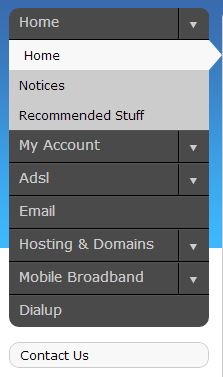
Log into http://my.imaginet.co.za/ and click on Email in the menu on the left (Fig. 1).

Fig. 1
- You will be presented with a list of domains.
- Locate your email address by scrolling to the correct domain and clicking View.
- Scroll to the address you wish to modify, and click Edit.
- Next to Autoreply click Edit.
- Place a check in the box next to On. You will be able to disable the autoreply easily by clearing this option. This is useful if you often use the same autoreply message.
- Enter the text of the message, and click Save.
- If you experience any trouble, please give us a call on 086-111-1101 for assistance.
