Difference between revisions of "Monitor your Uncapped DSL usage"
Jump to navigation
Jump to search
(Created page with "Log into http://my.imaginet.co.za/ and click on ADSL in the menu on the left (Fig. 1). frame|left|Fig. 1 <br /> Your ADSL packages will be listed by use...") |
|||
| Line 1: | Line 1: | ||
| − | Log into | + | Log into [https://my.imaginet.co.za/ MyDot] and click on '''ADSL''' in the menu on the left (Fig. 1). [[file:Mydotmenu.JPG|frame|left|Fig. 1]] |
<br /> | <br /> | ||
Your ADSL packages will be listed by username, along with their usage for the current month. Uncapped packages are shown with their current star rating. Hovering the mouse over the package will display a summary, including total monthly usage, and an explanation of the star rating system. Clicking the '''Usage''' button will display cumulative monthly usage for all months since the package has been active. Monthly and daily breakdowns are not available via My[Dot] | Your ADSL packages will be listed by username, along with their usage for the current month. Uncapped packages are shown with their current star rating. Hovering the mouse over the package will display a summary, including total monthly usage, and an explanation of the star rating system. Clicking the '''Usage''' button will display cumulative monthly usage for all months since the package has been active. Monthly and daily breakdowns are not available via My[Dot] | ||
===Detailed usage info=== | ===Detailed usage info=== | ||
| − | In order to view a breakdown of usage by day, you will need to access Internet | + | In order to view a breakdown of usage by day, you will need to access Internet Solution's control panel at https://users.isdsl.net/ and log in with your '''uncapped ADSL username and password'''. <br /> |
Latest revision as of 10:52, 26 January 2022
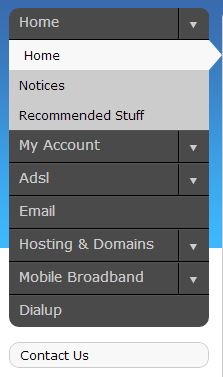
Log into MyDot and click on ADSL in the menu on the left (Fig. 1).

Fig. 1
Your ADSL packages will be listed by username, along with their usage for the current month. Uncapped packages are shown with their current star rating. Hovering the mouse over the package will display a summary, including total monthly usage, and an explanation of the star rating system. Clicking the Usage button will display cumulative monthly usage for all months since the package has been active. Monthly and daily breakdowns are not available via My[Dot]
Detailed usage info
In order to view a breakdown of usage by day, you will need to access Internet Solution's control panel at https://users.isdsl.net/ and log in with your uncapped ADSL username and password.
